
Andhra Pradesh Commercial Tax Online Payment: GST, VAT and Challan Guide
Businesses and taxpayers in Andhra Pradesh can pay applicable commercial taxes online through the relevant state tax payment service. The correct portal depends on whether the liability concerns Goods and Services Tax (GST), profession tax, a continuing VAT levy, or an assessment relating to an earlier tax period.
Where to pay Andhra Pradesh taxes online
| Payment category | Where to begin | Important distinction |
|---|---|---|
| CGST, SGST and IGST | GST common portal | Use the GST electronic cash ledger and challan/payment facility for current GST liabilities. |
| AP VAT, CST and older assessments | Andhra Pradesh Commercial Taxes | Check the department's currently published legacy tax and payment services. |
| Profession tax and other state levies | AP Commercial Taxes Department | Choose the applicable state service; do not use a GST challan for an unrelated state levy. |
| Government service discovery | National Government Services Portal | Official government directory describing state e-payment services. |
Applicable law and important provisions
Andhra Pradesh Goods and Services Tax Act, 2017
Section 9 - Levy and collection: Provides for Andhra Pradesh GST on taxable intra-state supplies, subject to exemptions and statutory conditions. Section 9(2) addresses the deferred application of GST to specified petroleum products until a notified date. Consult the GST portal for current payment processes and notifications.
Andhra Pradesh Value Added Tax Act, 2005
Section 4 - Charge to tax: Sets out the levy of VAT on sales covered by the Act and applicable schedules, subject to subsequent amendments and the transition to GST. VAT continues to be relevant for certain non-GST goods and legacy liabilities. The precise rate, tax point and applicable version of the law must be checked for the transaction and period.
Profession tax
The Andhra Pradesh Tax on Professions, Trades, Callings and Employments Act, 1987 governs profession tax within its scope. It is separate from GST; registration, payment schedules and applicable slabs should be checked with the state department.
Historical tax heads
The earlier e-payment interface offered VAT, Central Sales Tax (CST), Turnover Tax (TOT), AP Luxury Tax (APLET), AP Entertainment Tax (APET), AP Profession Tax (APPT), TDIN payments and entry tax. These labels describe the legacy portal and do not establish that every tax remains chargeable for current transactions.
Steps to make a commercial tax e-payment
- Identify the tax. Determine whether the liability is GST, VAT/CST for a relevant period, profession tax or another state levy.
- Open the relevant official portal. Use gst.gov.in for GST or the AP Commercial Taxes website for state-administered services.
- Select the appropriate payment service. Sign in where required and choose the relevant tax type and purpose of payment.
- Enter the required particulars. These may include TIN, GSTIN, GRN or another registration/reference number, firm name, assessment or return period, amount and payment date.
- Verify the challan. Confirm taxpayer details, tax head, tax period, amount and any interest or penalty before proceeding.
- Pay using an offered method. Complete the payment only through the authorized payment gateway or bank option displayed by the portal.
- Save proof. Download the challan, acknowledgement, transaction ID and bank confirmation, and check that the payment has been credited against the correct liability.
Earlier AP Commercial Taxes e-payment screen
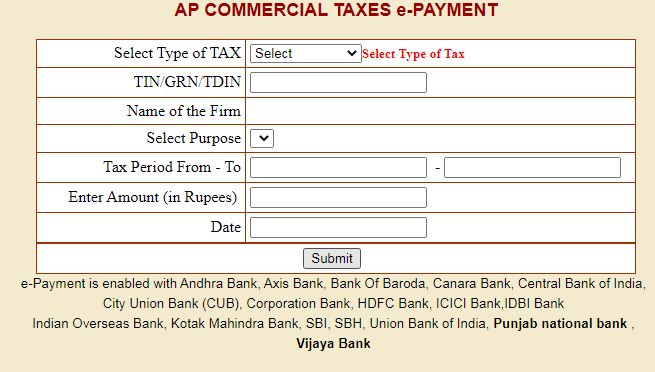
The original form asked taxpayers to select a tax type (VAT, CST, TOT, APLET, APET, APPT, TDIN or entry tax), enter a TIN/GRN/TDIN, provide the firm name, select the payment purpose, enter the tax period, amount and date, and submit the details before choosing a bank/payment gateway. These instructions remain useful for interpreting older challans but should not be treated as the current payment workflow.
The original payment address was AP Commercial Taxes legacy e-payment page. It may be unavailable or superseded. Avoid entering credentials or making payments on an unverified redirected page.
How to verify a payment or obtain a challan
After payment, retain the bank transaction reference and portal challan number. Check the payment history, electronic cash ledger or e-receipt facility on the same official portal used for the payment. If a bank account was debited but the tax ledger was not credited, follow the portal's grievance or payment-status procedure and avoid an immediate duplicate payment without checking the transaction status.
Frequently asked questions
Can VAT still be paid in Andhra Pradesh?
Yes, where a VAT liability remains legally applicable, including certain non-GST goods or historical assessments. The applicable state payment facility must be confirmed before paying.
Can I pay Andhra Pradesh GST on the old commercial taxes website?
GST payments are generally made through the official GST portal, not through the old VAT e-payment form.
What if my challan has the wrong tax head or period?
Do not assume the amount will be automatically reallocated. Consult the relevant portal's correction, refund or grievance procedure and preserve the original transaction record.
Official websites and references
- GST Portal, Government of India
- Andhra Pradesh Commercial Taxes Department
- National Government Services Portal - AP Commercial Taxes services
- CBIC Tax Information Portal - GST legislation and notifications
- Petroleum Planning and Analysis Cell - state VAT and sales tax rates
Disclaimer: This article provides general information, not legal or tax advice. Portal services, tax rates, statutory provisions and payment procedures may change. Verify the applicable law and instructions on official government websites before making a payment.