
How to Reschedule an RTO Appointment Online through VAHAN
An applicant who has already booked an appointment for a vehicle-related service at a Regional Transport Office (RTO) may be able to change the appointment date through the Ministry of Road Transport and Highways VAHAN portal. This guide explains the online process, documents, fees and relevant legal provisions.
Official VAHAN portal and who can reschedule
The VAHAN Citizen Services portal is the official Ministry of Road Transport and Highways online service for many vehicle registration, permit, tax and related RTO transactions. Select the relevant state and RTO where prompted. The Parivahan Sewa portal provides additional official information.
Where the relevant RTO provides an appointment rescheduling facility, an applicant with an existing booking may request a new date. Appointment availability and whether rescheduling is permitted after the original appointment has passed depend on the applicable state process.
Step-by-step procedure to reschedule an RTO appointment
Step 1. Open the VAHAN vehicle-services website
Visit VAHAN e-Services. Choose your state or RTO if the portal asks you to do so.

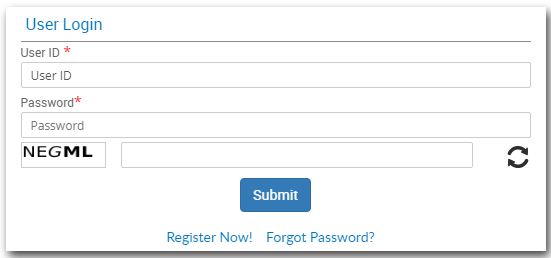
Step 2. Sign in or select the appropriate citizen service
Depending on the state and portal version, use the service menu or the VAHAN login page. If account registration is required, see the guide to registering for VAHAN online services.
Step 3. Locate appointment management
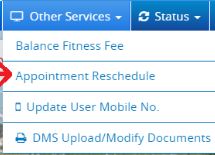
Open the vehicle-service application or, if available, choose Other Services and Appointment Reschedule. The exact wording varies by state. Some portals provide appointment booking, reprinting or cancellation under a separate menu.
Step 4. Enter the requested application and vehicle details
Provide the vehicle registration number, application or receipt reference and any chassis-number digits requested on screen. The earlier portal workflow requested the last five digits of the chassis number; use the number of digits specified by the current portal rather than assuming it is unchanged.
Step 5. Complete mobile verification
Where prompted, generate a one-time password (OTP) on the registered mobile number, enter it and submit. Never disclose an OTP to another person.
Step 6. Select an available appointment slot
Choose the appointment option under the relevant service details, select a vacant date and time and confirm the booking. Do not assume a slot is reserved until the portal issues a confirmation.
Step 7. Check fees and complete any required payment
Review the fee details. If the portal requires an additional payment, use its supported payment gateway and keep the receipt. An extra rescheduling fee is not universally applicable; it depends on the service and local rules.
Step 8. Save confirmation and attend the RTO
Download or print the revised appointment acknowledgement and any payment receipt. Attend the RTO on the confirmed date with the original documents required for the selected service.
Documents and information to keep ready
- Vehicle registration number and, where requested, chassis details.
- Existing application number, appointment acknowledgement or receipt.
- Access to the mobile number registered with the vehicle or application.
- Identity document and vehicle-related documents required for the underlying service, such as the registration certificate, insurance or pollution-under-control certificate where applicable.
- Fee payment receipt and updated appointment confirmation.
Document requirements differ for registration certificate changes, hypothecation, fitness, permit and other vehicle services. Follow the checklist generated by the relevant RTO application.
Applicable law: Motor Vehicles Act, 1988 and Central Motor Vehicles Rules, 1989
VAHAN is an administrative electronic service system. The Motor Vehicles Act, 1988 and the Central Motor Vehicles Rules, 1989 govern the underlying vehicle transactions; they do not create a universal right to reschedule every RTO appointment online.
- Section 39, Motor Vehicles Act, 1988: Restricts driving a motor vehicle in a public place unless it is registered in accordance with the Act and displays its registration mark as required.
- Section 41: Governs registration of motor vehicles and the registration certificate, subject to the statutory procedure.
- Section 49: Concerns notification of a change of address recorded in a registration certificate.
- Section 50: Deals with transfer of ownership of a motor vehicle and associated reporting requirements.
- Section 51: Contains special provisions for motor vehicles subject to hire-purchase, lease or hypothecation agreements.
- Section 56: Governs certificates of fitness for transport vehicles.
- Sections 66 and 81: Address the requirement for permits and renewal of permits, subject to the applicable provisions and exemptions.
Procedural forms, supporting documents and fees are prescribed under the Central Motor Vehicles Rules, 1989, together with applicable state rules and notifications. For the authoritative current text, refer to India Code and the Ministry of Road Transport and Highways.
If you cannot find the reschedule option
- Confirm that you are using VAHAN for a vehicle-related service rather than Sarathi for a driving-licence service.
- Check whether your state, RTO and application type support online appointments.
- Verify the vehicle or application number and the registered mobile number.
- Check whether the appointment window has expired or whether slots are unavailable.
- If the option is absent, contact the concerned RTO using contact details published on the official state transport website or Parivahan portal.
For guidance on related transactions, see RTO online applications and payments and modifying an RTO application or uploading documents.
Frequently asked questions
Can I reschedule an RTO vehicle-service appointment online?
Where the state or RTO enables appointment management on VAHAN, an applicant may select the available rescheduling or appointment option and choose another vacant slot.
Is an appointment change available for every state and vehicle service?
No. Portal menus, booking windows, cancellation rules and slot availability depend on the state, RTO and service.
What details are usually needed?
The vehicle registration number, application or receipt number, registered mobile number and authentication details may be required. Follow the specific portal prompts.
Must I pay again to reschedule?
Not necessarily. A fresh fee is payable only where the portal or applicable state rules require it. Check the payment summary before paying.
What should I bring to the RTO?
Carry the revised appointment confirmation, application or fee receipt, and original documents requested for the particular vehicle service.
Important disclaimer
This article provides general information on government online vehicle services and does not itself accept applications, payments or appointment bookings. Actual procedures, charges, appointment availability and document requirements are determined by the competent transport authority. Use official government portals for transactions and contact the relevant RTO about payment or application disputes. No fee is charged by this website for this informational guide.